CRM App Development with Rocket.new: From Idea to Launch
Building a CRM app is no longer only a long, expensive development project. Businesses still need planning, workflows, data structure, security, and a clear user experience, but the way teams build the first version has changed.
Earlier, a CRM project usually started with requirement documents, wireframes, backend planning, developer handoffs, UI revisions, and weeks of technical setup before anyone could even test the product. That model still works for large enterprise systems, but it is too slow when a business wants to validate an idea, build an internal tool, or launch a focused CRM quickly.
This is where Rocket.new becomes useful.
Rocket.new is not just another prompt-based app builder. It positions itself as a vibe solutioning platform that combines research, AI app building, and competitive intelligence in one place. The idea is simple: instead of building from a blank prompt alone, Rocket.new helps teams move from problem understanding to product creation with more context behind every decision.
For CRM app development, this matters a lot. A CRM is not just a set of screens. It needs to reflect how a business manages leads, customers, deals, support tickets, follow-ups, and reporting. If the logic is wrong, the CRM becomes another tool people avoid using.
Rocket.new helps reduce that risk by letting teams describe the CRM they want, generate a working structure, refine workflows, add features, and move closer to launch without starting from scratch.
A CRM app helps businesses manage customer relationships, sales activity, communication history, and customer data from one central system.
Instead of storing details across spreadsheets, emails, WhatsApp chats, call notes, and disconnected tools, a CRM brings important customer information into one place.
A good CRM app usually helps teams:
In simple terms, a CRM app works like a business memory. It helps teams know who the customer is, what happened earlier, what needs to happen next, and who is responsible for it.
That is why CRM software is important for sales teams, support teams, marketing teams, service businesses, agencies, startups, and growing companies.
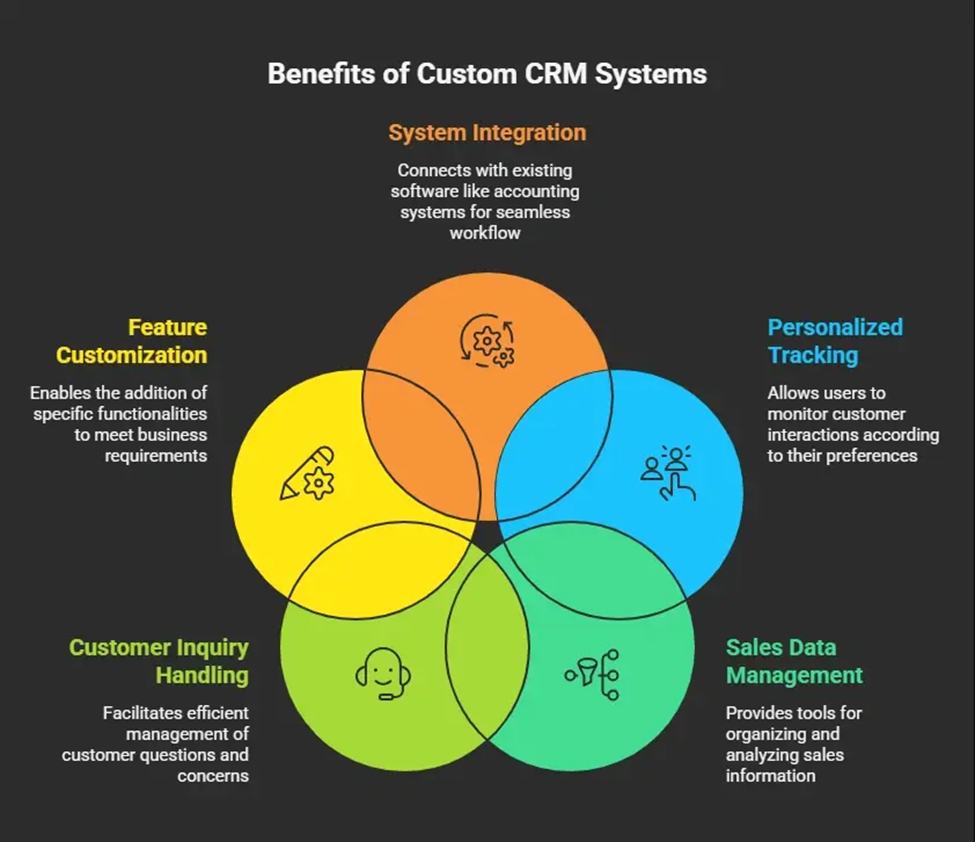
Off-the-shelf CRM software works well for many businesses. Tools like HubSpot, Zoho, Salesforce, and Pipedrive already solve common CRM needs.
But they also come with a limitation: the business has to adjust itself around the software.
That becomes a problem when a company has a unique sales process, custom approval flow, industry-specific data, special reporting needs, or internal workflows that generic CRM tools do not handle properly.
A custom CRM app solves this by matching the system to the business process.
For example, a real estate business may need lead source tracking, property matching, site visit scheduling, broker assignment, and payment follow-ups. A jewellery business may need customer profiles, occasion tracking, product preferences, high-value purchase history, and repair/service reminders. A manufacturing company may need dealer management, quotation tracking, distributor follow-ups, order status, and account-level reporting.
A generic CRM may support some of these things. A custom CRM can be built around all of them.
That is the real value.
Custom CRM apps are useful when businesses need:
But there is one problem: traditional custom CRM development can take a lot of time.
This is exactly where Rocket.new changes the workflow.
Rocket.new helps users build apps by describing what they want in natural language. For CRM development, that means you can start by explaining your business, your users, and the core features your CRM should include.
Rocket’s documentation gives CRM as a direct example, where users can prompt it to create a CRM web app with a contact list, deal pipeline, activity log, and email integration. It also recommends starting lean, mentioning the platform, stating the purpose clearly, and adding 3–5 important features upfront.
That advice is important because most people make the same mistake with AI app builders: they ask for too much in one prompt.
A messy prompt creates a messy app.
A better approach is to build the CRM in stages.
Start with the core workflow. Then refine. Then add logic. Then improve UI. Then connect data. Then test with real users.
Rocket.new supports this style because users can keep modifying the app through conversation, visual edits, and additional prompts. It can help change colors, add features, fix bugs, and connect services like databases, email, payments, and AI through connectors.
For CRM apps, this is powerful because the first version does not need to be perfect. It needs to be usable enough to test the workflow.
The biggest mistake in CRM development is assuming that the feature list is the strategy.
It is not.
Contact management, dashboards, reports, and pipelines are just features. The real question is: what business problem should the CRM solve?
Rocket.new’s intelligence layer is useful because it is designed to connect context, data, and past actions so that prompts lead to more refined output over time. Rocket describes its intelligence layer as a way to bring intelligence, build, and execution into one place, helping teams make clearer decisions instead of working from disconnected information.
For CRM development, this can help teams think beyond screens.
For example, before building a CRM, a business can use intelligence-led thinking to understand:
This matters because a CRM should not become a dumping ground for data. It should guide action.
A smart CRM tells the team what to do next. A weak CRM only stores information.
Rocket.new’s intelligence angle helps move the build closer to useful business logic, not just interface generation.
Rocket.new’s Solve feature is especially relevant when the CRM idea is still unclear.
Most businesses do not begin with perfect requirements. They usually begin with scattered thoughts like:
That is not enough to build a good CRM.
Solve can help turn scattered business inputs into a clearer product direction. Rocket.new has published use cases where Solve turns scattered CRM, competitor, and buyer data into structured outputs such as deal briefs, stakeholder mapping, and customer insights for sales teams.
The same thinking can be applied before CRM development.
Before you build, Solve can help define:
This is where Rocket.new becomes more than a builder.
The real benefit is not just “type a prompt and get an app.” That is the shallow version.
The better use case is: use intelligence and Solve to clarify the CRM logic, then use Build to generate the product, then refine it through prompts and testing.
That is a stronger development flow.
Do not start by saying, “Build me a CRM.”
That is too vague.
Start with the business problem.
For example:
“Build a CRM for a B2B sales team that manages inbound leads, assigns them to sales reps, tracks follow-ups, manages deal stages, and shows a dashboard for monthly revenue pipeline.”
This is already better because it gives Rocket.new a clear direction.
You should define:
For a first version, keep the scope tight. A bloated CRM becomes difficult to use.
Before generating the app, use Rocket.new’s intelligence and Solve-led thinking to structure the CRM idea.
Ask questions like:
“What fields should a CRM for a real estate sales team include?”
“What should be the sales pipeline stages for a jewellery B2B CRM?”
“What workflows should a custom CRM for a manufacturing distributor business include?”
“What reports should a sales manager see every week?”
This step helps you avoid building a generic CRM that looks fine but does not match real business operations.
Solve can help convert business context into clearer requirements, which can then be used as input for the build.
Once the requirement is clear, create a focused build prompt.
Example:
“Create a web-based CRM app for a small B2B sales team. Include lead management, contact profiles, deal pipeline, activity log, task reminders, notes, user roles, and a sales dashboard. The CRM should allow sales reps to add leads, move deals across stages, record follow-ups, and view upcoming tasks. Managers should be able to see total leads, open deals, closed deals, and revenue pipeline.”
This prompt gives Rocket.new enough structure to generate a useful first version.
You can also mention design preferences:
“Use a clean dashboard layout, left sidebar navigation, table-based lead view, kanban-style deal pipeline, and simple cards for key metrics.”
That gives the app a better starting interface.
After the prompt is submitted, Rocket.new can generate the first app structure.
This may include screens such as:
At this stage, do not expect the app to be final.
Think of it as the first working draft.
The goal is to check whether the structure matches the business workflow.
Once the first version is generated, review it like a business user, not just like a designer.
Ask:
This review is important because a CRM succeeds only if people use it daily.
A beautiful CRM with confusing workflows is useless.
This is where Rocket.new becomes practical.
Instead of rewriting everything manually, you can refine the app using commands and follow-up prompts.
Examples:
Rocket.new supports iteration through natural language, which makes the CRM easier to shape after the first version is created. Its docs also mention that users can refine apps through chat, visual editing, and connectors after the initial build.
This is important because CRM development is rarely perfect in one attempt.
The workflow improves when real users test it.
A basic CRM stores data.
A smarter CRM helps users act on that data.
Once the basic app is ready, you can use Rocket.new to add intelligence-driven features.
For example:
These features can make the CRM more useful because they reduce manual thinking and help users focus on action.
But do not add all of them at once.
Start with the features that solve the biggest workflow problem.
A CRM becomes more valuable when it connects with other business tools.
Depending on the use case, you may need integrations such as:
Rocket.new’s connector-based approach can help extend the app with databases, email, AI, and other services through prompts.
For a CRM, this can reduce manual data entry and make the tool more useful in daily operations.
Testing is not optional.
A CRM may look correct from the founder’s perspective but fail when a sales rep uses it under pressure.
Test the CRM with actual users and observe:
This stage will expose weak points quickly.
Do not defend the first version. Improve it.
Once the app is tested and refined, it can be launched for internal or external use.
Before launch, check:
For internal CRM tools, start with a small team first. Let them use it for a few days, collect feedback, and then roll it out to the larger team.
For client-facing CRM portals, testing needs to be stricter because customers will interact with the system directly.
A strong CRM app should include only the features that support the business workflow.
Common CRM features include:
| Feature | Purpose |
| Contact Management | Stores customer and lead details |
| Lead Management | Tracks new leads and their status |
| Deal Pipeline | Shows opportunities across sales stages |
| Activity Log | Records calls, emails, notes, and meetings |
| Task Reminders | Helps teams follow up on time |
| Customer Portal | Gives customers access to selected information |
| Sales Dashboard | Shows pipeline, revenue, and team performance |
| Role-Based Access | Controls what each user can view or edit |
| Mobile CRM | Helps teams access data on the go |
| Reports | Supports better decisions with CRM data |
| Integrations | Connects CRM with other business tools |
| AI Summaries | Reduces manual note reading and review time |
Do not blindly add every feature. That is how CRMs become bloated.
A CRM should feel useful, not heavy.
Even with Rocket.new, CRM development still needs thinking.
The tool can speed up creation, but it cannot magically fix unclear business logic.
Common challenges include:
The biggest risk is not technical failure. It is building a CRM that nobody wants to use.
Rocket.new can reduce development friction, but the business still needs to define what matters.
Rocket.new is useful because it helps compress the distance between idea, structure, working app, and iteration.
Instead of waiting weeks for the first prototype, teams can generate a CRM draft quickly, test the workflow, and improve it through natural language.
Its intelligence and Solve capabilities make the process stronger because CRM development should begin with context, not just code. Rocket.new’s research-first approach is built around the idea that blank prompts often lead to guesswork, while context-driven building creates better product decisions.
That is the real advantage.
Rocket.new helps teams:
CRM app development is not just about creating a contact database. It is about building a system that helps teams manage relationships, follow up better, close deals faster, and make smarter decisions.
Rocket.new makes this process faster by combining intelligence, Solve, Build, and iteration in one workflow.
But here is the honest part: Rocket.new will not save a badly thought-out CRM idea.
If the workflow is unclear, the app will also be unclear. If the business does not know what data matters, the CRM will become messy. If the team does not want to use the system, no builder can fix that.
The right way to use Rocket.new is to start with a clear business problem, use Solve to shape the CRM logic, generate a focused first version, test it with real users, and keep improving it.
That is how you move from idea to launch without wasting months on unnecessary development cycles.
Build a professional consulting or corporate website with Alexi. Modern design, responsive layouts, and flexible customization—perfect for business, agency, and service websites.
