Artificial intelligence is no longer a future-facing concept in product design – it is the present reality shaping how digital interfaces are built, tested, and refined. In 2026, AI tools for product designers moved well beyond novelty: they automate repetitive work, generate design variations in minutes, surface UX issues from data, and accelerate every stage of the design process. According to a survey by Lyssna, 93% of product designers are already using generative AI tools in their current work, and 73% believe AI as a design collaborator will have the most significant impact on their discipline this year.
At Xpand, we design a customer portal for Microsoft Dynamics 365 Business Central – a product where interface quality directly affects how logistics and ERP teams work every day. AI has become a practical part of how we design and improve it.
This article covers how AI tools fit into a real product design workflow: where they save time, where they fall short, and what the cases from our own practice look like in practice.
AI tools for product designers are most valuable when they eliminate the work that consumes time without requiring creative or strategic input. Here is a practical overview of tools that form part of my regular workflow:
These tools act as a layer of technical support that frees the designer’s time for work that actually requires human input: defining the problem, interpreting user behavior, and making decisions that shape the product’s direction.
According to a report by Vena Solutions from 2025, 73% of sales and marketing professionals confirm that AI helps them surface insights from data they would not have found independently. This applies equally to design research. AI is increasingly used not just for generation but as a research instrument – collecting large volumes of data, identifying behavioral patterns, and flagging pain points that might take weeks to surface through traditional methods.
In practice, this shows up in three areas:
Removing the mechanical parts of the research process – transcription, data collection, initial pattern recognition – frees time for what actually requires human expertise: interpreting complex user motivations and making design decisions that AI cannot make alone.
Many existing products – particularly in the logistics and ERP sector – carry interfaces that were functional when built but have since become genuinely difficult to use. AI tools are now practical enough to serve as a first-pass diagnostic on these problems.
We uploaded a screenshot of a widely used logistics database management platform to Claude with a prompt requesting a detailed UX audit. The audit identified five issues: no global delivery status, interface overload without visual hierarchy, low text contrast, unintuitive action buttons, and an unreadable event list. AI then proposed a redesigned mockup – tabbed structure, cleaner typography, repositioned CTAs – which served as a starting point for manual refinement.
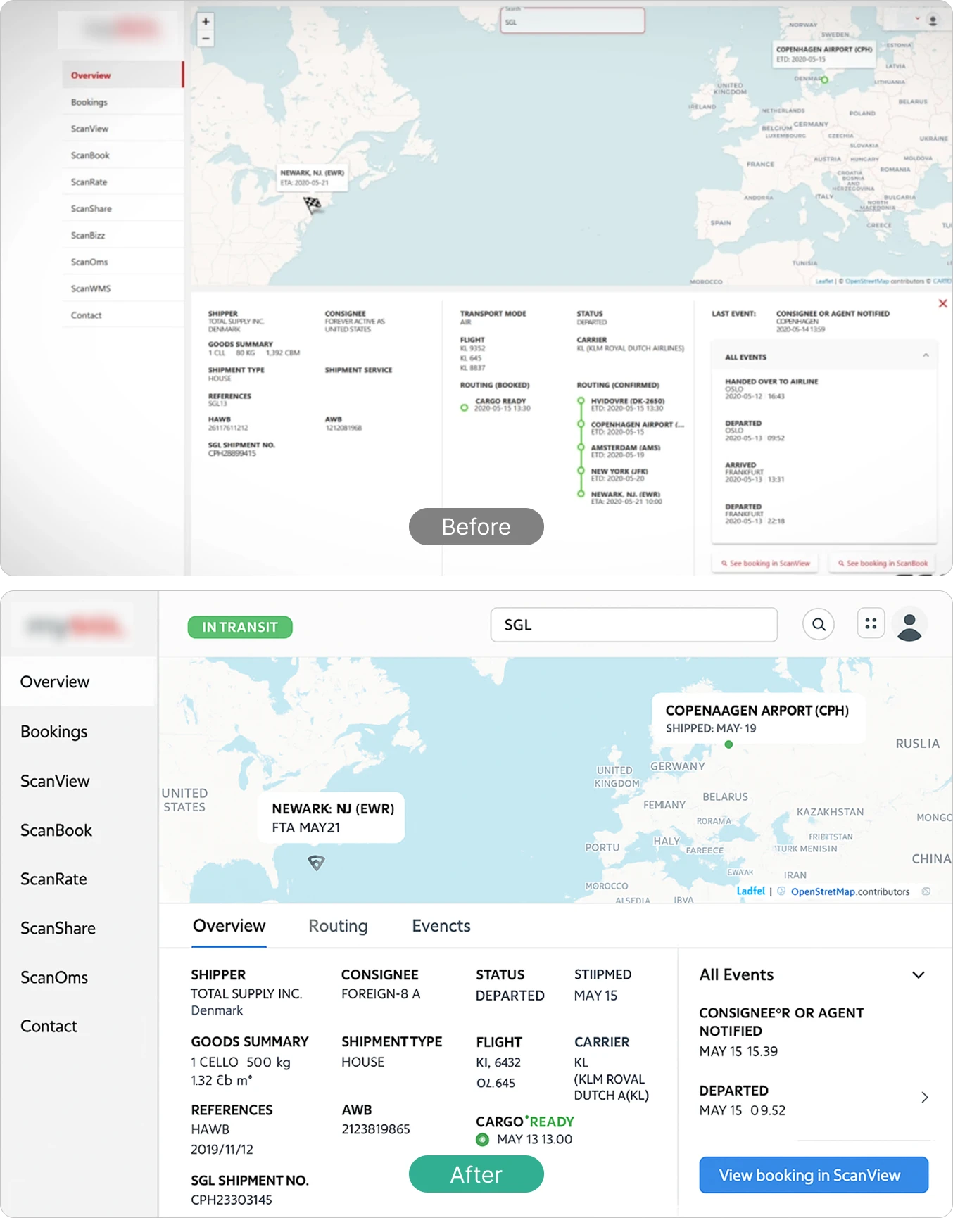
The output is not production-ready and requires refinement. The value is the speed: from problem identification to visual hypothesis in minutes, but not days.
A common scenario in B2B platform work is the need to quickly generate redesign directions for team discussion – not a full UX overhaul, but a visual update that signals a new direction.
We worked with a customer portal that was structured but visually dated: overloaded with colored blocks, misaligned emphasis, and an aesthetic that did not meet modern B2B expectations.
AI proposed a clean minimalist layout: generous white space, a single primary action highlighted, the aggressive filter panel replaced with a lighter toolbar, and a clear grid that improved readability across high-volume data.
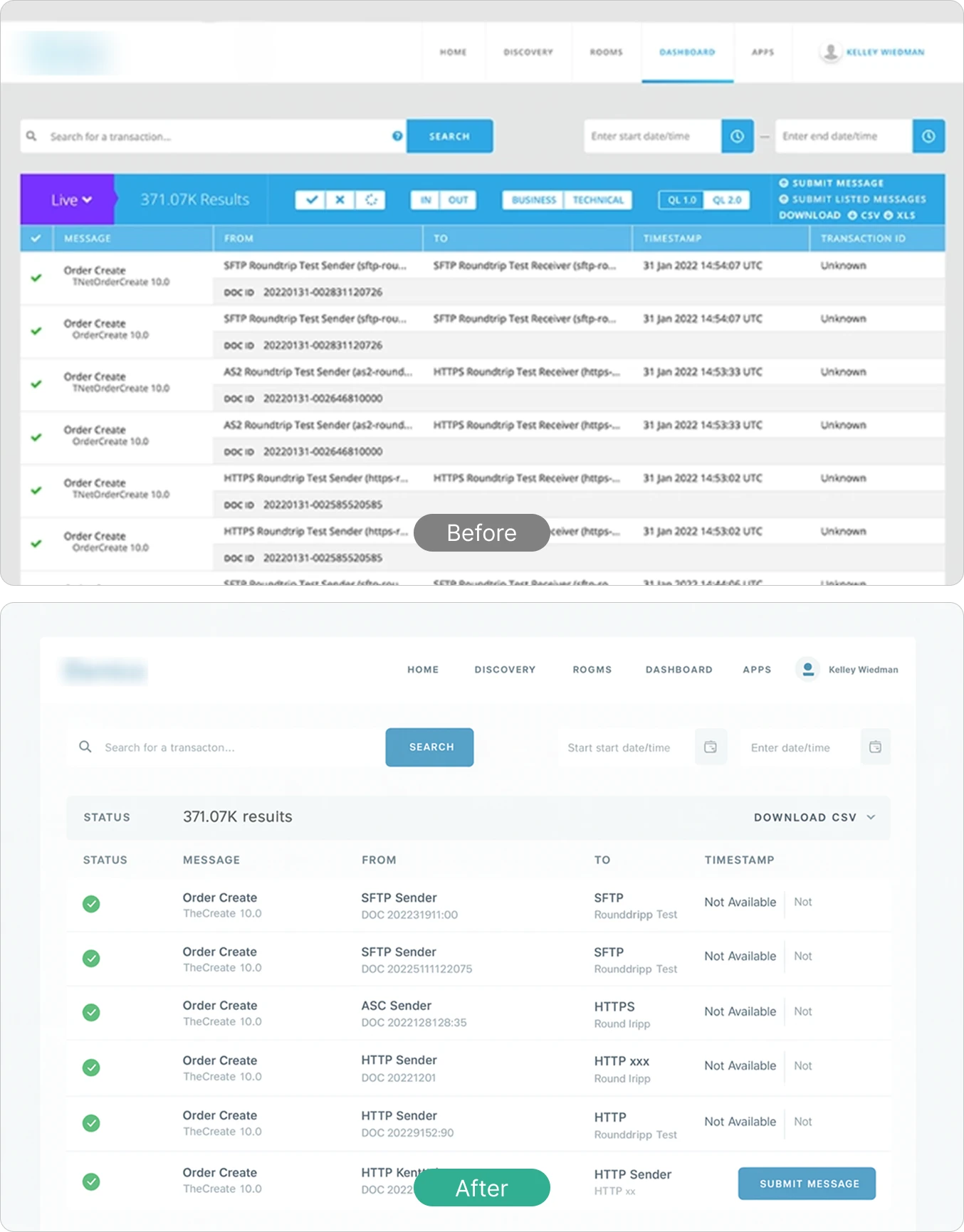
The element-level output needed manual correction, but the overall visual direction was clear and aligned the team without hours of manual ideation.
One practical extension of this workflow: feed Claude your brand guidelines alongside a prompt that describes your visual preferences, and you can generate a ready-to-use style guideline as output. Pass that guideline back to an AI tool – Figma Make, for example – and ask it to build screens based on it. The result is more consistent, more stable output, and significantly less manual correction at the end.
At Xpand Portal, AI helps the design team test UI/UX hypotheses quickly and maintain visual consistency across a dynamic product – exactly the kind of workflow described above.
What designers need to develop now
A November 2024 Hub Spotreport on AI and web design found that approximately 49% of UX designers were already using AI to experiment with new design strategies. The remainder cited frequent errors and loss of nuance – concerns that remain valid in 2026, even as the tools have improved.
A study presented at the CHI ’25 conference found that designers use AI tools most at specific stages – ideation and analysis – rather than across the board. This matches practice: AI works best on bounded, well-defined tasks.
Two skills are becoming essential. First, prompt engineering: formulating precise instructions that produce useful output. Second, critical evaluation: assessing AI results for bias and loss of product identity, and deciding with confidence what to use and what to discard.
AI can generate options at scale. Deciding which option is right – for the user, the product, and the brand – remains a human decision.
At Xpand, AI is applied selectively: to automate repetitive tasks, accelerate research, and generate design hypotheses that speed up team alignment. Strategic and creative decisions remain the designer’s responsibility.
If you are working with Microsoft Dynamics 365 Business Central and need a product that makes that data accessible through a well-designed self-service portal, book a free demo session at Xpand Portal.
Build a professional consulting or corporate website with Alexi. Modern design, responsive layouts, and flexible customization—perfect for business, agency, and service websites.
